Layouts 4 Ning and more!
Where do I put the layout code?
So you have found yourself a Ning Theme that suits you but how do you get it on your page?
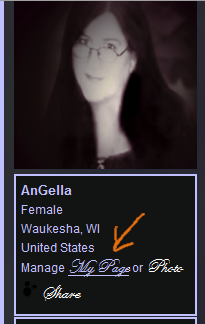
To add a layout code to your Ning page, click the "My Page" Link below your image.
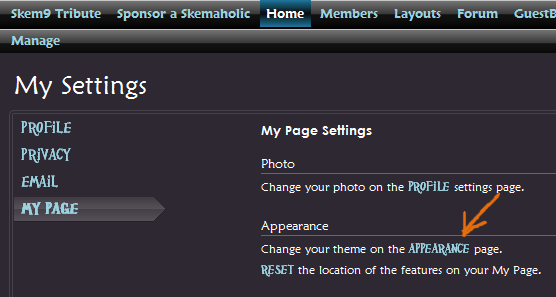
This will take you to a page that says My Settings.
Find the link that says "Appearance" and click on that.
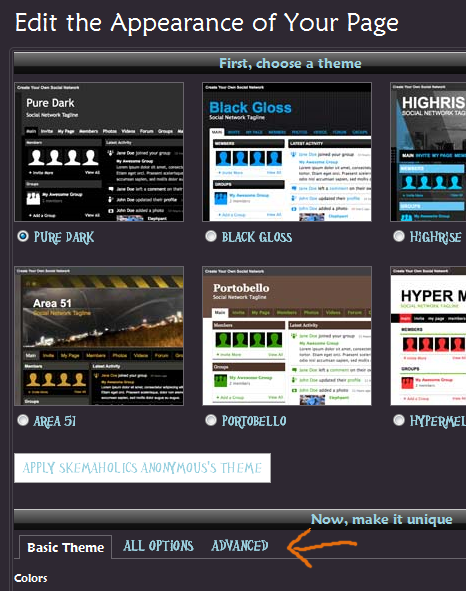
At the top of this page it will say "Edit the Appearance of Your Page"
Scroll down past the theme choices to the area that says "Now, make it unique"
Here there are three tabs,
* Basic Theme
* All Options
* Advanced
To add your code you will want to click on "Advanced"
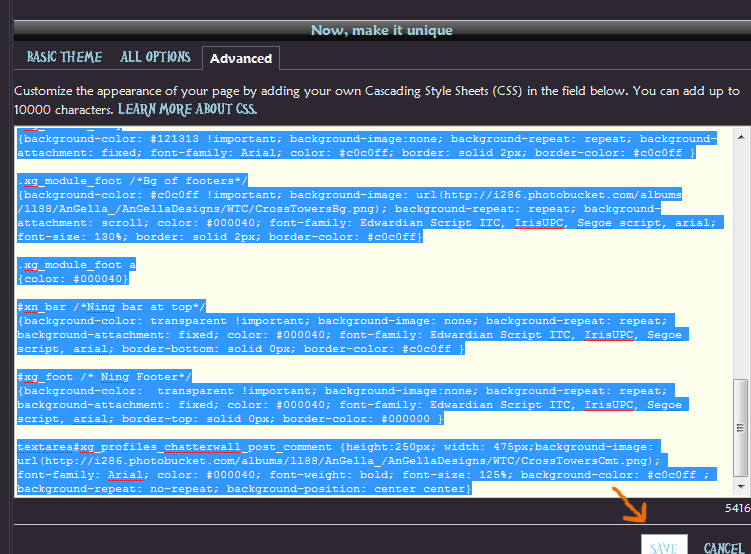
Once here you will likely see another code. Just delete that code and paste in your new code. Once you have your code pasted in there click on Save and Viola!
You can then use the *All Options tab to change the google ad colors.
Under "Colors" the Body color box will change the background color of the ads.
Under "Text" the Body color box will change the text color in the ads and the "Links" color box will change the color of the links in the ads.
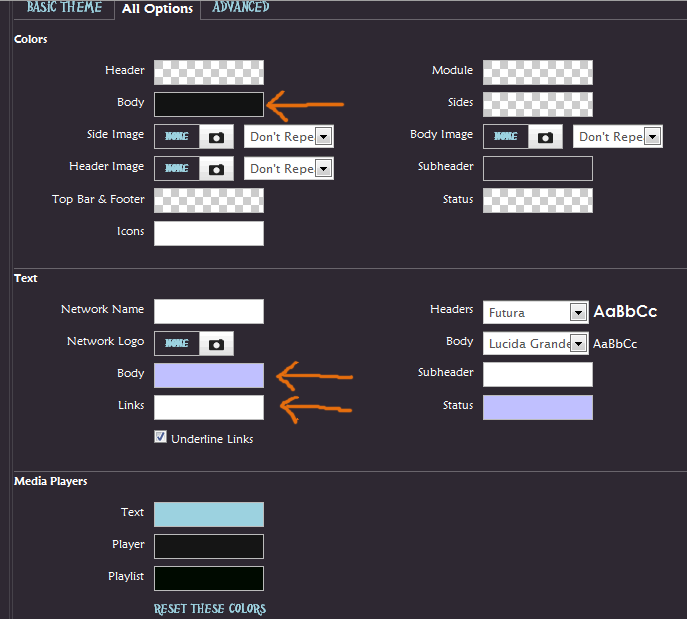
Once you have these set to your liking click save.
If you have any Questions please ask them below.
To add a layout code to your Ning page, click the "My Page" Link below your image.
This will take you to a page that says My Settings.
Find the link that says "Appearance" and click on that.
At the top of this page it will say "Edit the Appearance of Your Page"
Scroll down past the theme choices to the area that says "Now, make it unique"
Here there are three tabs,
* Basic Theme
* All Options
* Advanced
To add your code you will want to click on "Advanced"
Once here you will likely see another code. Just delete that code and paste in your new code. Once you have your code pasted in there click on Save and Viola!
You can then use the *All Options tab to change the google ad colors.
Under "Colors" the Body color box will change the background color of the ads.
Under "Text" the Body color box will change the text color in the ads and the "Links" color box will change the color of the links in the ads.
Once you have these set to your liking click save.
If you have any Questions please ask them below.
Views: 160
Search
Translate!
Forum
Sharing Thanks to everyone Hugs of Peace and good Health allways. Hippy ... 5 Replies
Started by Hippys Themes in Meeting Place. Last reply by Hippys Themes May 4.
Shiny Happy Random Thread 1601 Replies
Started by AnGella in Meeting Place. Last reply by Jon Blanco Oct 24, 2024.
Untitled
Started by Zohra in Meeting Place Sep 26, 2024.
RIP Skemanon 2009 - 2021 27 Replies
Started by AnGella in Announcements!. Last reply by AnGella Jun 3, 2023.
Apologies for Delayed Moderation 9 Replies
Started by AnGella in Announcements!. Last reply by ღCustom Creationsღ Test Page Apr 21, 2021.
Generators!
SiteModel
Ning Generator
Skinny Ning
Biker Or Not

Create!
Contribute to SA
Find this site helpful? Please consider a donation!
Random Ning Networks
Birthdays
© 2025 Created by AnGella.
Powered by

